Images and GIF
In order to insert an image or a GIF in Markdown, simply write the following code :

It is better to create a folder when there are images or GIF, it is therefore easier to move all documents.
Modify an image
To modify an image, we use Inkscape, a free and open-source software.
These are the steps to follow to modify an image:
- Modify the image using Inkscape.
- Select the image and go to
File→Document properties.... - Click the button
Resize page to drawing or selectionor simply useCmd + Shift + R. - Save the file as
.svg, which allows the possibility to re-modify the image later on.
Record a GIF
To record a GIF we use Gifox 2 available on mac.
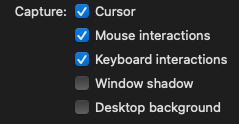
Gifox settings
Make sure that the following settings are enable/disable.